How to get your business on ChatGPT: claim it in Business Hub, which OpenAI opened in beta on November 10, 2026. You verify ownership by phone, email, DNS record or Shopify, then pass an ID check. Claiming is free at launch and lets you correct your details, but OpenAI says it doesn't guarantee ChatGPT recommends you.
Can you claim your business in ChatGPT now?
Last checked: November 15, 2026.
Yes, if OpenAI counts you as eligible. On November 10, 2026, OpenAI launched Businesses in ChatGPT as a beta. It had leaked four days earlier, when Juozas Kaziukėnas posted a screenshot on X of an unreleased "Claim your business in ChatGPT" page. The launch matches that page:
| What the leaked page offered | What the launch gives you |
|---|---|
| See how your business shows up | A dashboard of mentions, website clicks and discovery topics, with 7-day and 28-day views |
| Show customers what you offer | Edit your business details, and upload a product feed with prices and stock or connect a Shopify store |
| Help customers make decisions | A Business Agent that answers shoppers' questions from information you supply. Limited to eligible US ecommerce and online service businesses |
Claiming a profile and publishing a Business Agent are free at launch, according to VentureBeat's report on OpenAI's briefing. OpenAI hasn't ruled out charging later.
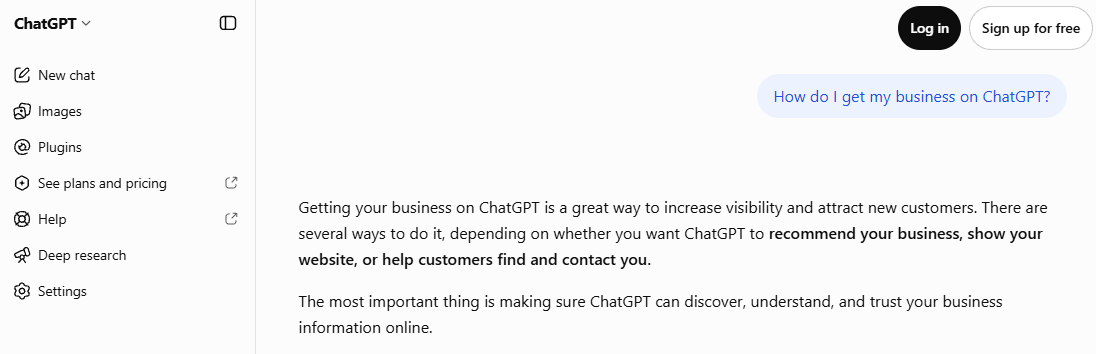
Before the launch, I asked ChatGPT "How do I get my business on ChatGPT?" logged out on November 7, from South Korea and from the US. The South Korea answer said ChatGPT "doesn't currently have a general business registration page like Google Business Profile." The US answer gave five steps, and none was a profile to claim. Both assumed a local business: the US one asked for a city and suggested strengthening a Google Business Profile.
How do you claim your business in ChatGPT?
- Sign in to ChatGPT with the account that will manage the business, and open Business Hub.
- Search for your business by name and confirm you're the owner or an authorized representative.
- Pick a verification method. OpenAI offers a code sent to a business phone or email, a TXT record added to your website's DNS, or a Shopify connection. Only the methods that fit your business are shown.
- Pass the identity check. The person managing the profile verifies with a government-issued photo ID through Persona before editing details, publishing an agent or viewing the dashboard. OpenAI also asked me for business registration documents.
- Wait for review. OpenAI emails its decision. Mine came on November 14, the same day I submitted: "Your submission to add your business to ChatGPT was approved after review." That is one claim, so it doesn't say how long others wait. The blue check appears once OpenAI approves the profile.
If you control your DNS, the domain method needs no phone number or inbox tied to the business. DeltaV Digital's walkthrough of its own November 10 claim recommends it.
Can a B2B software company claim a business in ChatGPT?
OpenAI hasn't said. Its sign-up FAQ says eligibility depends on factors including industry, location, and its verification and integrity checks, and OpenAI is holding some categories back without listing them. Claiming starts with businesses that have a website, which describes almost every software company.
The Business Agent is narrower: eligible ecommerce and online service businesses in the US, and OpenAI hasn't defined "online service." One report says a claim from outside the US was put on a waitlist on launch day. As of November 14, I haven't found a report of an approved claim from a B2B software company, so treat eligibility as unconfirmed until you try.
I tried it for Answered AEO, which helps B2B software companies and has a website. I chose the marketing agency category. Business Hub accepted both the emailed code and the DNS TXT record, then asked for a photo ID and business registration documents. I sent both on November 14, and OpenAI approved the claim the same day. That is one approval in the marketing agency category. It doesn't show that a B2B software company would be approved, so eligibility for software is still unconfirmed.
What does the Business Hub dashboard show?
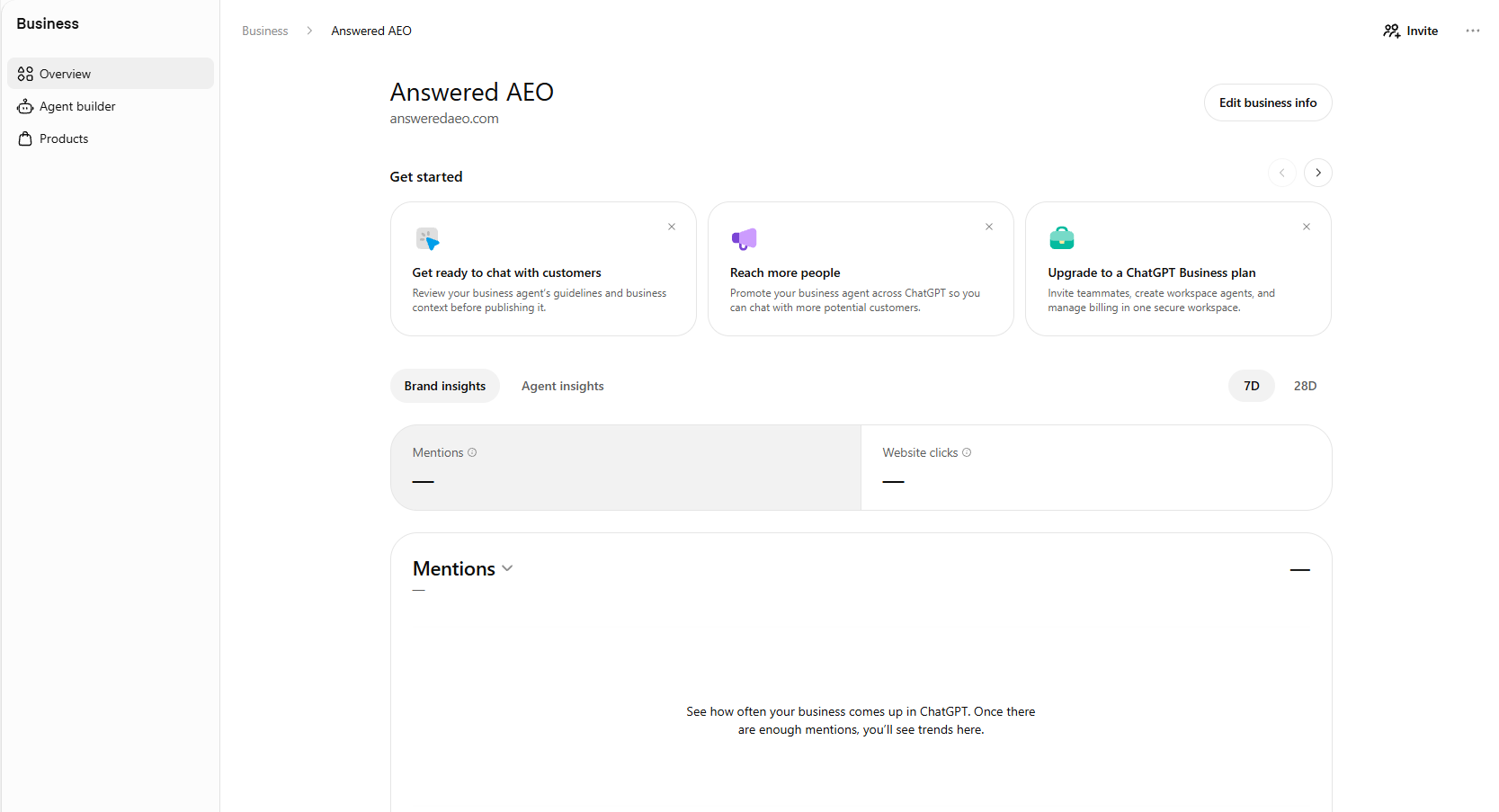
The dashboard shows aggregate numbers over 7 or 28 days: mentions, website clicks and discovery topics, which OpenAI describes as common themes in conversations where your website is cited. Three limits apply:
- For an online business, a mention counts only when ChatGPT references your website. A name alone doesn't count.
- Numbers appear only once enough conversations meet OpenAI's thresholds, so a small company may see blanks. A blank isn't a zero.
- OpenAI says clicks don't confirm website visits or conversions, and it doesn't share users' conversations or Business Agent chats with businesses.
The dashboard counts mentions across all questions. It doesn't show which buyer question produced one, or who ChatGPT named instead of you.
On November 15, the day after approval, our dashboard shows a dash for both Mentions and Website clicks. The page says "Once there are enough mentions, you'll see trends here." It has Brand insights and Agent insights tabs, and 7-day and 28-day views. That blank is the second limit above, not a zero.
What can you do in ChatGPT today?
Four options exist. Only the first decides whether ChatGPT can read your site at all, and none of them buys a recommendation.
| Option | Who it's for | Does it help a software company get recommended? |
|---|---|---|
| Let OpenAI's search crawler read your site | Every business | Yes. It's the starting point |
| Claim your profile in Business Hub | Eligible businesses with a website | It corrects your facts and shows mentions. OpenAI says it doesn't guarantee better placement |
| Share a product feed | Shops selling physical products. Shopify and Etsy catalogs are already connected; other merchants join a waitlist | No. It's built for shopping results |
| Advertise in ChatGPT | Businesses buying ads, in the markets where ads have launched | No. Ads sit apart from the answer |
How do you let ChatGPT's search crawler read your site?
ChatGPT search finds pages through a crawler called OAI-SearchBot. OpenAI's crawler documentation says sites that block it won't appear in ChatGPT search answers. To allow it, add this to the robots.txt file at the root of your site (yoursite.com/robots.txt):
User-agent: OAI-SearchBot
Allow: /
OAI-SearchBot is separate from GPTBot, which collects training data for OpenAI's models. OpenAI treats each setting on its own, so you can block GPTBot and still appear in ChatGPT search:
User-agent: GPTBot
Disallow: /

User-agent: OAI-SearchBot
Allow: /
OpenAI says changes take about 24 hours to take effect. Robots.txt isn't the only thing that can block the crawler: check your firewall or bot protection settings too.
Can you pay ChatGPT to recommend your business?
No. You can buy an ad, but OpenAI says ads don't change the answer. Its advertising principles of January 16, 2026 say "Ads do not influence the answers ChatGPT gives you", and that ads are labelled and kept separate from the answer.
For B2B software, ads have a second limit. OpenAI shows ads only on its Free and Go plans. Plus, Pro, Business, Enterprise and Education accounts don't see them, so a buyer researching on a company ChatGPT account won't see your ad at all.
What does a claimed profile change, and what doesn't it?
A claimed profile lets you correct facts: your pricing tiers, the products you sell, the regions you serve. That matters, because an AI answer can carry old pricing or a feature you retired years ago.
A profile doesn't decide whether ChatGPT recommends you over a competitor. OpenAI says ChatGPT keeps making its own recommendations and that claiming doesn't guarantee higher placement or more sales. When a buyer asks "what's the best expense tool for a 50-person startup?", ChatGPT searches the web and answers from the pages it finds: review sites, "best tools" lists, comparison pages, Reddit threads and your own site.
Google Business Profile is the closest comparison. Claiming one gets your facts right, and Google says complete and accurate information makes a business more likely to show up in local results. But Google ranks those results mainly on relevance, distance and prominence, which includes reviews and how well known the business is. No one has published a test of whether a claimed ChatGPT profile changes which companies it names, and I haven't run one.
Is being cited the same as being named?
No. ChatGPT can cite your pages and still recommend someone else. In October I ran 17 buyer questions for Selah, a pricing tool for creators, through ChatGPT, Gemini, Perplexity and Google's AI answers. None of the questions named Selah. Of the 67 answers that came back, 4 named Selah. Selah's own site was cited as a source in 7.
Two of those citations were in ChatGPT. It cited Selah's blog posts on pricing an Instagram reel and pricing exclusivity as sources, then recommended other tools. Neither answer named Selah.
Selah sells to creators rather than businesses, but the pattern holds for software buyers' questions too: being a source and being the answer are counted separately. A claimed profile wouldn't have changed either of those two answers. What changes them is pages that answer the buyer's question and name you as the answer, on your site and on the sites ChatGPT reads.
What should a B2B software company do now?
- Check what ChatGPT says about you. Ask it the questions your buyers ask, logged out, and save the answers with their sources. How to check what AI says about your company covers the setup step by step.
- Fix the facts at the source. If an answer is wrong, find the page it came from. An old pricing page, a stale review profile or a retired feature page is the usual cause.
- Allow OAI-SearchBot, as above.
- Try to claim your profile. Decide who verifies the business and what your details should say, so the profile matches your website. If Business Hub doesn't find your company or declines the claim, note the date and the message you got, and try again later, since eligibility in a beta can change.
- Answer the comparison questions yourself. Buyers ask "X vs Y" and "best tool for Z". If the only pages answering those are your competitors' and review sites, those are the pages ChatGPT cites.
If you'd rather see where your company stands before doing any of this, the free AEO teardown runs these checks for you.
Sources
- OpenAI, Introducing Businesses in ChatGPT, November 10, 2026.
- OpenAI Help Center, Setting up your business on ChatGPT.
- Juozas Kaziukėnas, screenshot of ChatGPT's unreleased "Claim your business" page, X, November 6, 2026.
- VentureBeat, OpenAI lets you claim your business in ChatGPT and set up a custom agentic AI customer sales rep, November 10, 2026, checked November 15, 2026. Source for the free-at-launch pricing, reported from a briefing with OpenAI's vice president of monetization.
- PPC Land, Businesses gain ChatGPT click and mention counts in OpenAI's Business Hub, checked November 15, 2026. Source for the eligibility FAQ wording, the click and threshold wording, and the waitlisted non-US claim.
- DeltaV Digital, How to Claim Your Business in ChatGPT, checked November 14, 2026. A first-hand account of one agency's November 10 claim; its business-type rules come from launch-day press, not from the author's own test.
- OpenAI, Overview of OpenAI crawlers, checked November 7, 2026.
- OpenAI, Power product discovery in ChatGPT, merchant program page, checked November 7, 2026.
- OpenAI, Our approach to advertising and expanding access to ChatGPT, January 16, 2026, checked November 7, 2026.
- OpenAI, Testing ads in ChatGPT, February 9, 2026, updated August 11, 2026, checked November 7, 2026. Free and Go plans only; launched in the US, then Canada, Australia, New Zealand, the UK, Mexico, Brazil, Japan and South Korea.
- Google, Tips to improve your local ranking on Google, Google Business Profile Help, checked November 7, 2026.
- ChatGPT, answers to "How do I get my business on ChatGPT?", logged out, November 7, 2026, asked from South Korea and from the US (VPN). Screenshot and full text captured by Brandon Bedford.
- OpenAI, email "Your business has been added to ChatGPT", received November 14, 2026, approving the Answered AEO claim, and Brandon Bedford's screenshot of the Business Hub overview page for Answered AEO, November 15, 2026.
- Answered AEO, Selah run of October 24, 2026: 17 buyer questions that don't name Selah, asked through DataForSEO to ChatGPT, Gemini, Perplexity and Google AI answers; 67 answers returned.